Webhook Inbox & Replay · Public beta
CATCH EVERY WEBHOOK. REPLAY IT WHEN YOU'RE READY.
A small tool for developers: give Stripe, GitHub or any other service a unique URL, see exactly what it sent, and resend the original request to your own endpoint with one click.
See the product
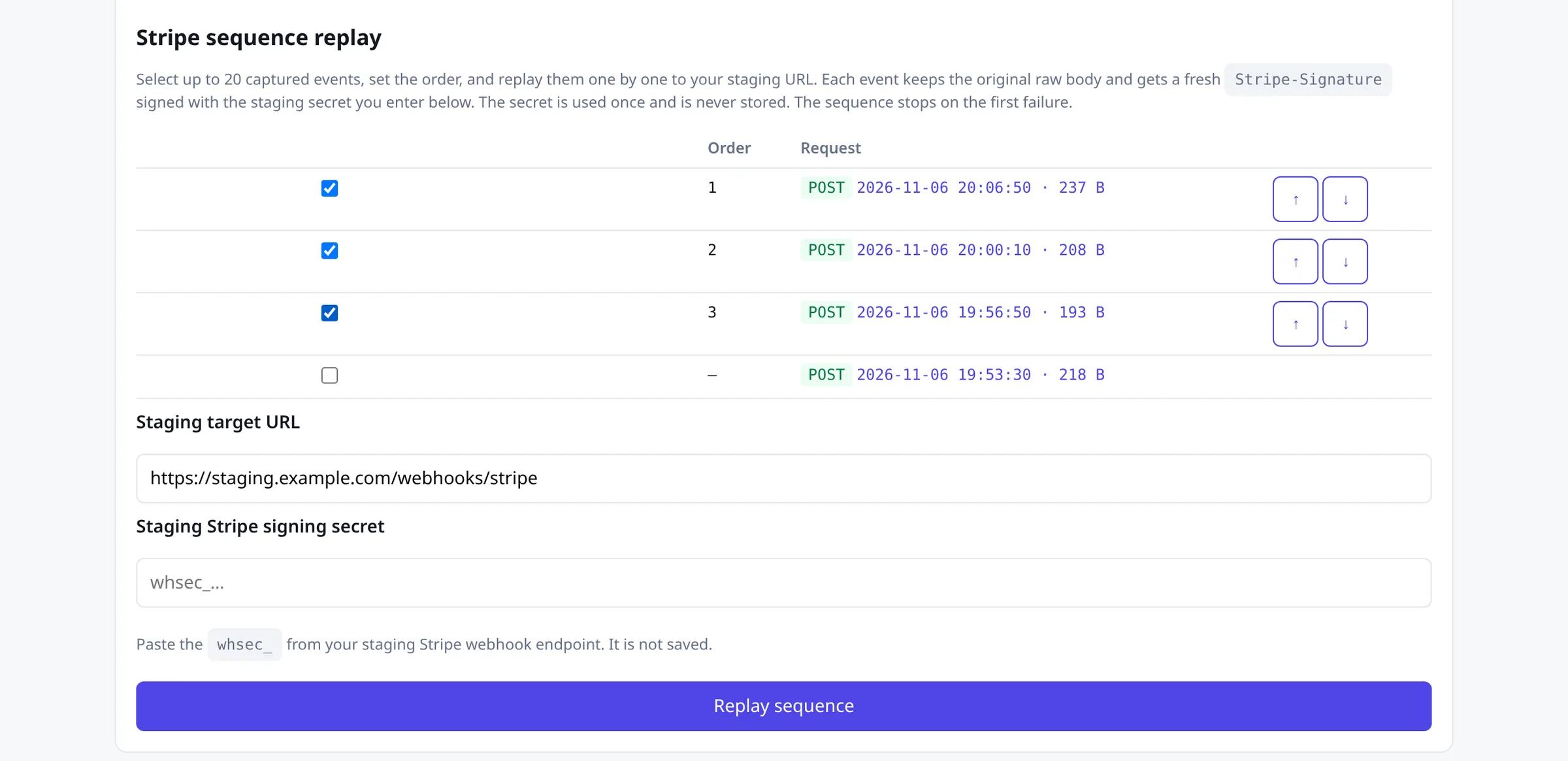
Screenshots from the real Webhook Inbox app (sanitized synthetic demo data — no customer payloads, emails, tokens or secrets). Public preview below; no signup needed to look.
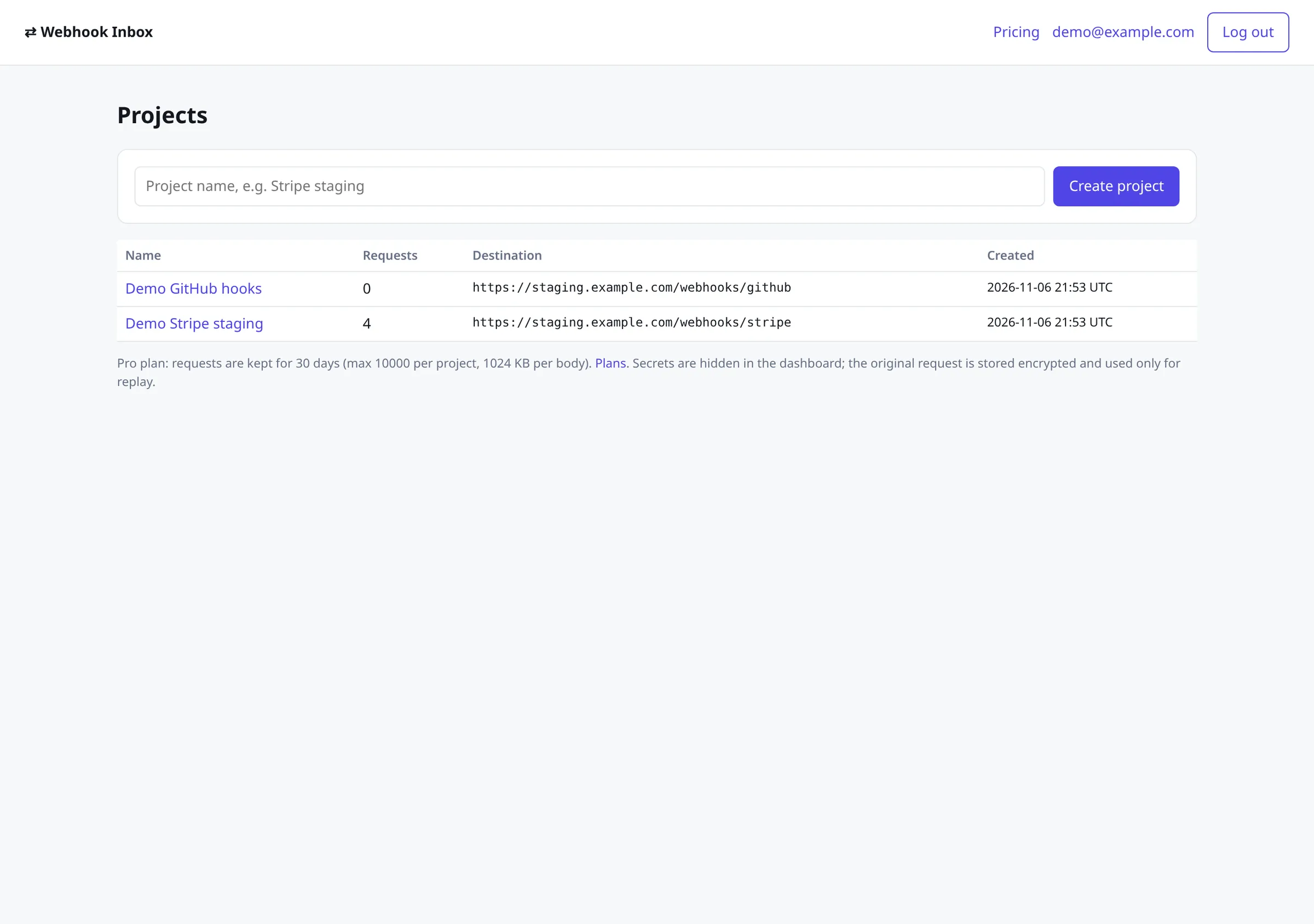
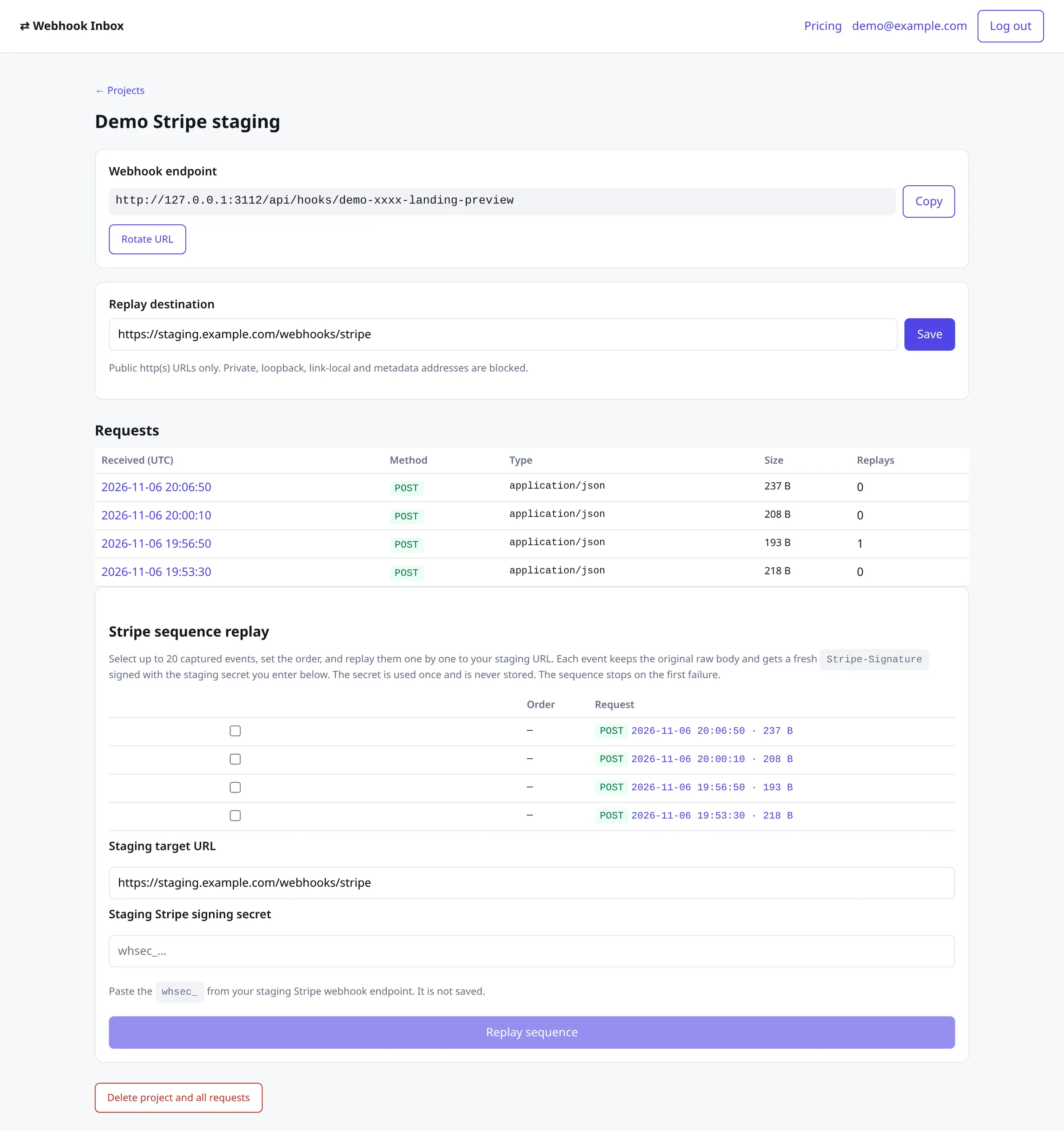
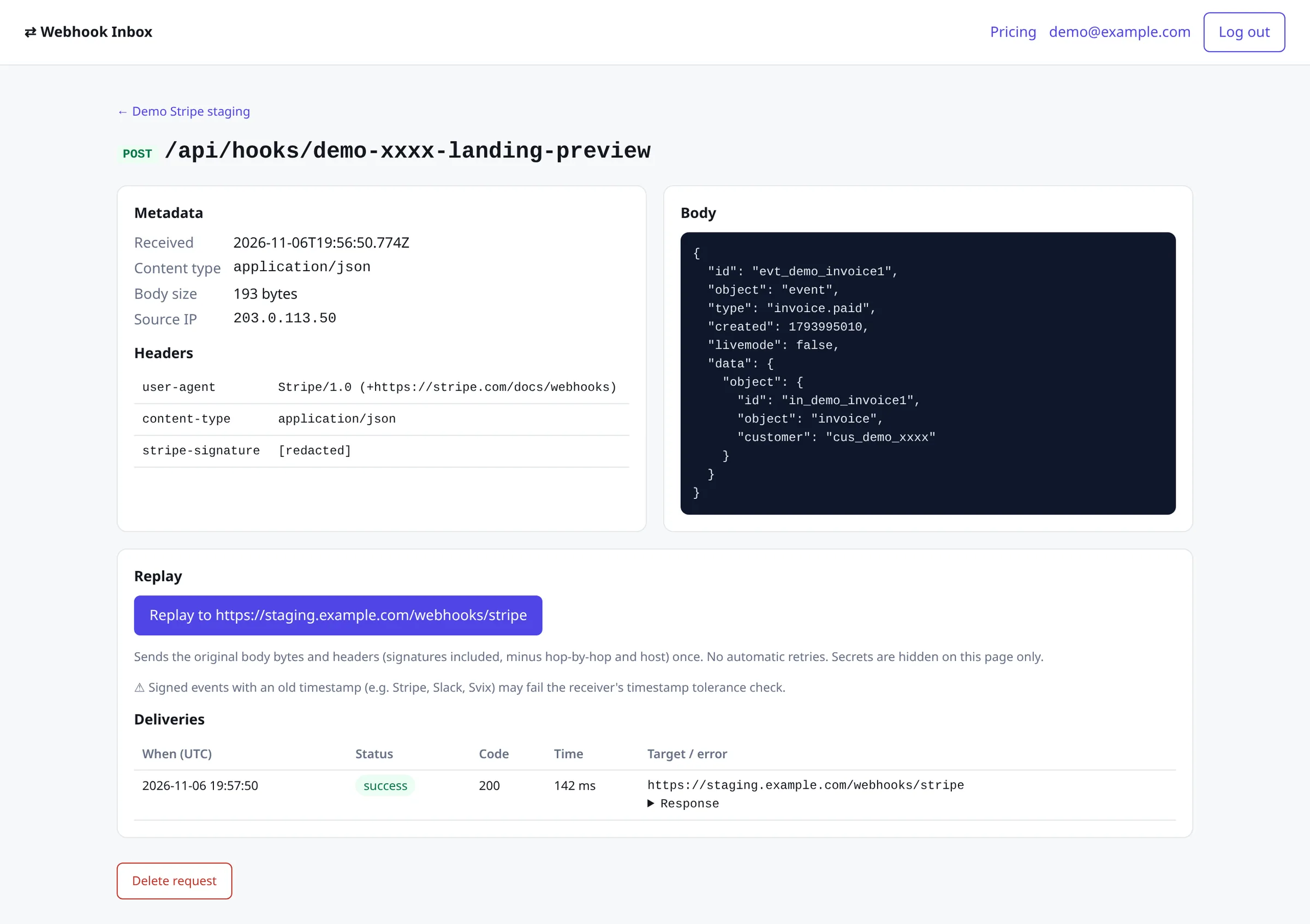
In practice — Normal Replay (Free + Pro): your tunnel was down for invoice.paid → fix the handler → Replay once to ngrok or staging with the original body and signature. On old Stripe events the original Stripe-Signature timestamp may fail Stripe's ~5-minute check.
In practice — Stripe Sequence Replay (Pro · €9/month VAT included): staging needs checkout.session.completed → invoice.paid → customer.subscription.updated in order with a fresh signature. Pick up to 20 captured Stripe events, paste the staging whsec_ once (never stored), replay; stops on the first failure.
Beta, honestly
This is an early public beta built and run by Tacko. There's a Free plan and a paid Pro plan. It's still young, so expect rough edges, and keep your own copy of anything important: captured requests are deleted after the plan's retention period. Servers run in the EU (Amsterdam).
What it's for
- Seeing the real payload a provider sends before you write the handler.
- Debugging a failing webhook: headers, body, content type and timing in one place.
- Replaying a captured event to your public tunnel URL (e.g. ngrok), staging or a fixed endpoint after you deploy a fix.
- Checking how your endpoint responds: status code, headers and body for every replay.
How it works
1. Endpoint. Create a project and you get a URL like /api/hooks/<token>. It accepts GET, POST, PUT, PATCH and DELETE and answers 200 {"ok":true}. You can rotate the URL at any time.
2. Inspect. Each request shows method, path, timestamp, size, source IP, headers and a formatted body. Secrets such as authorization headers, cookies, signatures and token-like fields are hidden on screen.
3. Replay. Set a destination URL for the project and press Replay. The original body bytes and headers are sent once, signatures included, minus hop-by-hop and host headers. There are no retries. Two kinds of replay:
Normal Replay (Free + Pro)
You captured a Stripe (or GitHub) webhook earlier. One click forwards that same raw body and original headers/signature to a public URL so you can see what your handler does with the exact request you already got. Use this when you need the original request as-is, not a re-signed one.
Example: your tunnel was down for invoice.paid → fix the handler → Replay once to ngrok or staging. Note: on old Stripe events, the original Stripe-Signature timestamp may fail Stripe's timestamp check (about 5 minutes).
Stripe Sequence Replay Pro · €9/month VAT included
Your staging handler calls constructEvent and needs a few Stripe events in order — up to 20 — e.g. checkout.session.completed, then invoice.paid, then customer.subscription.updated. Replaying one old event fails because the signature timestamp is stale. With Sequence Replay you pick several captured Stripe events, set the order, point at your staging URL, and paste that endpoint's whsec_ once. Each original payload is delivered in order with a fresh Stripe-Signature so constructEvent passes. It stops on the first failure. The secret is used for that run only and is never stored.
Example: checkout.session.completed → invoice.paid → customer.subscription.updated to your staging webhook URL.
Pricing
Free
€0
- 10 projects
- 7-day history
- 500 requests kept per project
- 256 KB bodies
- 120 incoming requests a minute per project
- 10 replays a minute (3 a minute per request)
- Stripe sequence replay —
Pro
€9 a month, VAT included
- 25 projects
- 30-day history
- 10,000 requests kept per project
- 1 MB bodies
- 600 incoming requests a minute per project
- 60 replays a minute (10 a minute per request)
- Stripe sequence replay (ordered, re-signed)
Pro · €9/month VAT included: ordered multi-event Stripe replay to staging with a one-shot whsec_ (never stored). Max 20 events.
| Feature | Free | Pro · €9/month VAT includedPro · €9/mo |
|---|---|---|
| Stripe sequence replay (ordered, re-signed)Sequence replay (re-signed) | — | Included |
Pro is billed monthly through Stripe. Cancel anytime from your account (billing portal); Pro stays active until the end of the paid period, and cancelling doesn't refund the current period. If a renewal payment fails, Pro stays active while Stripe retries, then the account returns to Free. See the terms.
Over the limits, requests get 413 (too large) or 429 (too many). Replays time out after 10 seconds and store up to 64 KB of the response.
Already have an account? Upgrade from Pricing in the app →
Security
- Accounts with email and password; each project is visible only to its owner.
- The original request used for replay is stored encrypted (AES-256-GCM) and is never shown in the dashboard.
- Replay only goes to public http(s) addresses. Private, loopback, link-local, cloud metadata and internal IPv4/IPv6 ranges are blocked, DNS is checked when connecting, and every redirect is checked again.
- You can delete a request, a project or your whole account at any time; deleting the account removes all its data.
Privacy
We count only aggregate numbers (sign-ups, projects created, webhooks received) per day, with no payloads, headers, emails or IP addresses. See the Tacko privacy policy.